



Any asset and inventory system should be able to tell you what equipment you have. Some tell you where it is or who it’s assigned to. But only one system actually syncs with your radio system rather than simply existing next to it.
Only MCM‘s asset, inventory, and work order management solutions can integrate with major radio manufacturer systems like Motorola Solutions, L3Harris, and EFJ/JVCKenwood. This critical capability removes silos, reduces errors, and supports faster, more reliable decision-making when every second matters.
What Radio System Integration Means for Asset Management
When there’s a gap between operational records and real-world communications, things fall through it. Integration closes that gap—before problems start.
When your asset platform is connected to your radio system, your systems actually talk to each other rather than relying on you to transfer and update from one system to the other. Instead of manually updating fields or toggling between different spreadsheets, you have real-time visibility into radio assignment and status. Alias changes, subscriber updates, and reassignments sync automatically. Maintenance schedules and billing models reflect actual radio details—not assumptions.
Here’s what happens when systems work together:
- Radio managers record configuration details and update statuses once—with changes reflected in both asset management and radio systems
- Radios are never assigned duplicate or out-of-range IDs or aliases, ensuring they remain operational
- Technicians troubleshoot faster with real-time ID, alias, and configuration data—without opening multiple databases
- Large numbers of radios get onboarded quickly and reliably
- Critical data stays consistent and accurate across all systems
- Other in-network departments like sheriff’s offices safely make updates themselves—reducing delays, fees, and extra work for radio managers
- Historical records automatically capture comm-focused details others miss, kept easy to search, filter, and export
- Mutual aid agencies manage their own radio configurations—ensuring smooth communication during joint emergency response
“We used to have to separately update an asset tracking database, two Motorola databases, and a radio alias database on the console. We’re now able to do all that in one update instead of four. It’s a HUGE time saver.” —Julie Gatzen, Network Operations Manager, State of Connecticut
Why Integration Matters in Public Safety Communications
Integration isn’t just about efficiency—it’s an additional layer of reliability and resilience. Every duplicate entry or missed update creates room for error, and those errors can ripple into misrouted calls, delayed responses, or radios that fail when needed most.
Today, everyone is being asked to do more with less. Radio integration saves time by eliminating duplicate steps and streamlining workflows. It saves money by reducing waste from misallocations and preventable downtime. It relieves the constant stress of reconciling mismatched data across systems. And most importantly, it protects lives and resources. If a radio goes down, knowing who has it is just as critical as knowing its technical state. It’s never just about the equipment—it’s about the person using it, too.
At the end of the day, integration gives teams the capacity to handle day after day of demanding, high-risk tasks without burning out or falling behind.
Why Other Asset Tools Fall Short in Radio Management
Other asset systems weren’t built for communications—even those built for public safety. Tracking turnout gear, vehicles, or laptops is one thing. Managing radios is another. Public safety communications is a complex discipline with ID ranges, alias logic, and workflows that can’t be forced into a generic asset model.
At the same time, many comms teams are handed IT asset management platforms or help desk tools by their larger government entity. These “one-size-fits-all” systems may work for software licenses, but they can’t meet the demands of public safety communications. They aren’t configurable enough to capture comms-specific details, they treat radios as static records instead of dynamic lifelines, and they force duplicate updates that waste time and increase risk.
MCM is different. We’ve spent decades building software around the realities of radio management. Workflows aren’t bolted on—they’re the foundation. And our trusted partnerships with Motorola Solutions, L3Harris, and EFJ/JVCKenwood weren’t built overnight. They’re the result of years of collaboration and a shared mission to keep communications reliable when every second matters.
“Specializing in public safety” is no match for specializing in public safety comms.
How Synced Systems Work Faster, Smarter, and Safer
Public safety agencies across the country use this integration to improve operations and ensure their communications equipment is always ready when it matters most—for their agencies, their team members, and the communities they serve.
“From June to August we onboarded 532 subscriber radios and completed 1,874 alias changes/asset transfers with a total of 2,406 items provisioned. We simply would not have been able to complete this volume of work within this timeframe without MCM.” —Julie Gatzen, Network Operations Manager
Capabilities vary by radio system and configuration. Integration can range from basic data exchange to full radio provisioning. Our team can help you explore which processes are available to you—and bring them to life.
See Radio-Integrated Asset Management in Action
MCM’s interoperability is a game-changer for mission-critical teams.
Contact us to learn more or schedule a walkthrough.
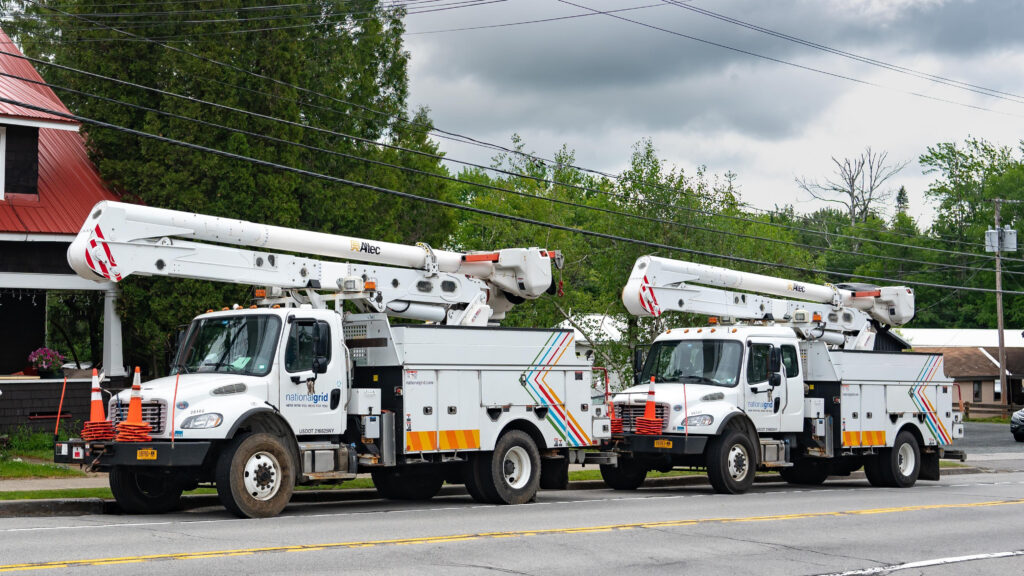
Mcmtech’s integrated asset, inventory, and work order management solutions give utility technicians everything they need—right at their fingertips. From parts and supplies to service history and installation details, our platform reduces equipment downtime, improves service outcomes, and enhances operational reliability. Here’s how MCM creates a seamless maintenance experience from start to finish.
A Day-in-the-Life of Utility Maintenance with MCM
The Service Side
A technician receives a work order on his tablet to service an LTE access point (AP). The work order links directly to the AP’s asset record. He taps the location field, and a live map opens showing the device’s exact location. Another tap reveals a ground-level view, showing exactly how to reach it. No more searching poles at the address.
The asset record contains everything he needs: manuals, past visit photos, a complete service history, commissioning notes, and previous sweep results. Comparing current readings to historical data reveals significant attenuation beyond prior degradation trends.
He checks antenna reflectivity to determine whether the antenna, cable, or connector is to blame—data points to a damaged antenna. The record confirms this is the first such incident for this location.
The antenna is tracked as a “child asset” under the “parent” AP, so all related info—warranty, install notes, specs—is just a click away. He replaces the antenna, performs a sweep to confirm it’s functioning, and updates the asset record with new commissioning notes. Because data fields sync across related records, he only enters the info once. It’s instantly visible across the system. No more delays waiting for handwritten notes to be entered later.
He submits a replacement request for the antenna directly in the platform—just a few clicks, no copying model numbers. The work order closes with sweep results attached, and the system logs a change history for full accountability.
The Parts and Supplies Side
The inventory manager receives an alert about the technician’s request. She filters inventory by vehicle and confirms this is the only truck without a replacement antenna on hand. She approves the request, which sends an alert to the technician that his ask is granted.
She locates a replacement easily because her records include model data, photos, and exact storage info—room, rack, shelf. Scanning the barcode as she pulls it triggers an alert to her laptop: this is the last stocked antenna of this type, prompting just-in-time reordering. No more warranty periods eaten up by equipment sitting on shelves!
The technician receives an auto-alert to pick up the antenna. At issuance, the system logs who received it, from whom, the date/time, and captures a digital signature. No more “I never got it” confusion.
The inventory manager uses MCM to create and send a purchase order for the new antenna. When the item arrives, the system automatically updates the available inventory for the designated stock location. If other items in the PO are still pending, the PO remains open. If this is the last item, the PO closes, letting the manager know she can process the invoice.
Why Streamlined Maintenance Matters for Utilities
Inaccurate, outdated records with information tracked in disparate systems lead to delayed fixes and unnecessary equipment downtime. Critical parts need to be rush ordered, which is expensive, or stocked in advance, chipping into their lifespan. Version confusion leads to things like premature replacements, incorrect installation, and time wasted looking for things. These inefficiencies don’t just frustrate staff—they impact customers too.
In the scenario above, the asset, inventory, and work order management software are unified in one solution, reducing steps, increasing accuracy, and improving accountability. Tracking detailed maintenance histories, accessing critical documentation, and managing inventory with precision are just a few of the ways MCM helps utilities provide unparalleled service and optimize operations.
Efficient and effective infrastructure maintenance is essential.
Schedule a demo to see what MCM can do for you.

Federal, state and local agencies across the U.S. are under pressure to ensure they’re operating efficiently and using tax dollars wisely. Equipment audits are a crucial part of this transparency. Often called the annual or yearly inventory, equipment audits help verify the existence and condition of critical assets and inventory, ensure compliance with regulations, reduce losses from missing or underutilized equipment, and improve budget planning. As effective as audits are for ensuring government efficiency, conducting them can be extremely time-consuming and labor-intensive, especially with outdated, manual methods. Fortunately, MCM makes it easy.
“We used to spend a ton of time sending field technicians and engineers out to reconcile physical inventory, but with MCM it’s so much simpler. It saves us a ton of employee hours. Plus, it provides a more accurate inventory count, which allows the State to be more accurate in its fiscal accounting.” – Julie Gatzen, network operations manager, Adesta on behalf of the State of CT
Effortless Reconciliation of Physical Assets
For many agencies, equipment audits still involve spreadsheets, paper records, and physical site visits, resulting in inaccurate and outdated records, significant personnel hours, logistical challenges, and limited visibility into asset status (like whether the equipment is in use, damaged, or in need of maintenance).
Manual audit tactics aren’t just ineffective, they’re cumbersome. “When we were using spreadsheets, it was a chore throughout the year and a major endeavor once a year to manage our county assets,” said Jake Thompson, County Emergency Communications Manager. “MCM removes the chore.”
Here’s how MCM transforms asset and inventory audits.
1. Multi-User Access to Centralized Asset and Inventory Data
With MCM, your team works within your live software solution, so everyone is using the same accurate, comprehensive, and current information. Permissions controls and complete change histories enhance data integrity, and seamless portability makes it easy to access and update information from wherever your team or assets are.
2. Remote Asset Verification
Verification confirms the existence, condition, location, and ownership of fixed assets on an asset list. MCM’s asset records track this info on an ongoing basis, which means agencies can verify a significant number of assets using the data in their solution. “We have around 1500 different items in our unit alone to verify. We have 80+ microwave shelters throughout the state. It’s difficult to visit each one,” says Julie Gatzen from CT. “With MCM, we see assigned equipment, lost items, and statuses. I can verify about 90% of our inventory remotely. It’s a huge time saver.”
3. Streamlined Manual Inventory Checks
When inventory needs to be reconciled in-person, knowing what’s supposed to be where is vital. With MCM’s asset audit module, users simply select a site, location, or vehicle to see a list of assets expected to be there. Users then scan or check off what’s found to quickly and easily confirm that equipment is where it’s assigned and identify missing or out-of-place items. “Running reports helps me locate the smallest of items,” said Jill Loyd, Radio Parts Manager, Polk County, FL. “My stress level doing my yearly inventory has reduced so much.”
4. Compliance and Grant-Funded Tracking
Automated alerts and compliance-tracking features ensure regulatory requirements are met. “With grant administration comes a lot more responsibility for being accurate with your inventory management,” said a major city Fire Captain tracking grant-funded items in MCM. “These audits are real. They want information, and they don’t fool around.” With MCM, agencies can tag assets as grant-funded, State-owned, or any other category to be tracked for specific compliance or accounting purposes, making the items easy to locate and report on when needed.
More for Less: Reliability Through Efficiency
Audits are meant to ensure departmental efficiency. Your audits should be efficient, too. Fewer site visits means less labor hours eaten up travelling. Accurate, up-to-date records means time isn’t wasted hunting for non-existent items. Automated workflows and synchronized data reduce duplicate steps.
While the spirit of audits may be about efficiency, an added benefit is reliability. Audits verify what equipment is where, and ideally, whether or not the asset is usable for agency operations (“status”). Agencies that transition from outdated, manual audits to digital solutions not only save time and resources, they also strengthen operational reliability.
Streamlining your auditing process lets you focus on the mission instead of the mundane.
Ready to Streamline Your Audit and Inventory Processes?
As government agencies focus more on efficiency and accountability, leveraging modern asset management platform like MCM’s is no longer just an option—it’s a necessity. Contact MCM today to see how our software can help you maintain compliance, reduce waste, verify expenditure and enhance operational efficiency.

One of the crucial decisions customers face when implementing a software solution is choosing between having it hosted on-premise or in the cloud.
8 Reasons Why Having Your Solution Hosted on the Cloud May Be the Better Choice
1. Lower Cost
Cloud hosting eliminates the substantial investment in hardware, infrastructure and maintenance needed for on-premise solutions. It also reduces IT departmental costs since it requires significantly less internal labor to implement, manage, and maintain.
2. Enhanced Security
Security is an essential part of hosting software, so cloud platforms invest heavily in advanced security measures, often surpassing what can be implemented in on-premise environments. MCM uses Microsoft Azure, which is widely considered one of the most secure cloud providers. Its comprehensive security features, compliance certifications, and advanced capabilities protect data, applications, and infrastructure. MCM’s hosted environment has additionally been security tested and verified by an independent third-party cybersecurity firm.
3. Most Efficient Use of Resources
Additional resources are always readily available on the cloud, eliminating the process of researching, pricing, bidding out, procuring and installing additional computing resources. Short on hard drive space? MCM will automatically increase your storage capacity without any service disruption. This lets you scale based on need rather than infrastructure.
4. Unparalleled User Accessibility
With cloud-hosting, users can access their software from anywhere there is an internet connection, without a VPN (and all of its hassles). Using handheld devices? The myMCMtech mobile app is optimized for integration with its cloud-based solutions. Whether you’re boots on the ground using software in the field or an office worker needed when away from your desk, cloud hosting lets you quickly and easily log directly into your solution.
5. Immediate, Labor-Free Updates + Maintenance
Cloud hosted software providers deploy all updates and patches without draining IT resources. Cloud customers always have the most recent version of their solution, and the latest features, patches and fixes, as soon as they are available, automatically installed. MCM performs the following remotely through the cloud: standard security updates (monthly), Windows server updates (monthly) and server OS version upgrades, SQL server updates (monthly) and version upgrades, VM hosting architecture, and SSL certificate renewals. Without this burden of routine maintenance, IT can focus on strategic, high-priority initiatives.
6. Immediate, Labor-Free Expert Support
With on-premise solutions, support often requires a member of the IT team to help determine the cause and/or implement the fix. IT reps that are already stretched thin are interrupted to reset yet another password, and getting the right IT rep for other support can cause delays. Cloud hosting facilitates support without IT involvement. MCM can access the user’s system, data and all components through the cloud. Plus, since they are experts with the software and are dedicated to customer support, they can identify causes and advise on processes more quickly and accurately.
7. Superior Recovery and Continuity
Whether you’re dealing with a natural disaster or a large technical outage, having data redundancies across multiple locations, secondary power sources, and frequent data backups help ensure quick recovery and continuity of operations. While these tactics and practices can be performed on-premise by your team, why take on the additional effort and cost when it is already automatically provided through the cloud? MCM automatically performs full data backups of its cloud-based solutions every night, as well as differential backups every two hours to capture new information. With alternate power sources from Microsoft, MCM guarantees 99.5% uptime for its servers.
8. Integration Expertise
Some of the most powerful elements of a software solution involve third-party integrations. For on-premise solutions, these are performed by the IT department and can be challenging and time-consuming. Cloud-based solutions allow the software’s developers and engineers, who understand exactly how their code interacts with other software, to manage integrations. Because MCM has previous experience integrating solutions with Motorola via Genesis, SAML Sign on, and Azure Sign on, smooth integrations with these key partners are easy to replicate in that environment.
And, Bonus!
For agencies following environmental sustainability guidelines, the cloud’s consolidation of data centers optimizes energy consumption, contributing to a more sustainable future.
There are many important benefits to choosing cloud hosting for your solution. For today, cloud hosting lets your organization focus on its mission and operations rather than administrative software management. For tomorrow, it is a key step towards staying competitive and future-proofing your organization.
For more information about cloud hosting your MCM solution, contact our team here!

Fire departments and law enforcement agencies both have high demands for managing equipment and gear. Yet, fire and police have very different structures and requirements in their asset and inventory management processes, as was discovered by MCM when developing its quartermaster capabiities. Understanding these differences is an important part of configuring the right software for your public safety needs.
It’s Much More Than Different Types of Items
All mission-critical resource management involves effectively, efficiently, and accurately distributing, tracking and maintaining vast amounts of equipment and supplies to a complex network of users. But first responder agencies are structured very differently from one another in ways that significantly impact workflows and channels.
The primary challenge for fire departments is capturing the complex hierarchy of how and where assets and inventory are used. Fire departments manage firehouses that in turn manage fire engines, EMS and respective crews. Records need to reflect this in a way that allows items, costs, usage, and more to be tracked and managed according to each subgroup. The primary challenge for law enforcement is the broad variety of items, users, and specifications to be accounted for. Their asset and inventory management system should make it easy for a wide range of people to interact with a wide range of items, using detailed permissions and processes to reduce errors, excess, and loss. The paragraphs below give more specific insight to what this looks like for fire and police.
Fire Department Inventory and Asset Management
A fire department often manages multiple firehouses. Each firehouse has a huge range of inventory and asset needs. Firehouses will request standard items such as axes, chainsaws, turnout gear and Personal Protective Equipment. They also need serialized wearables like custom-fit air masks and color-coded helmets, as well as properly configured technology like radios and devices. Firehouses also need house management supplies, like cleaning liquid and mopheads, and living comforts like mattresses and pillows. And of course, they need fully outfitted fire engines with pumps, hoses and all their parts.
Fire departments also manage Emergency Medical Services, often through their firehouses, but not always. This includes managing their vehicles, stretchers, AEDs, and health monitors, as well as their large list of medical supplies and drugs, which also have to track and account for lots and expiration dates. Firehouses have to find, pull and replace all perishable inventory in circulation before it expires. And many firehouse items, from hoses to air masks, require detailed records of preventive maintenance and inspection.
Managing the request, distribution, and tracking process is a gigantic and important task for fire departments. Being able to track costs down to the firehouse, crew, engine number, and more is extremely helpful for maintaining responsible usage and future resource and supply planning.
Law Enforcement Inventory and Asset Management
While fire departments will manage items through a firehouse tier, law enforcement agencies tend to issue and track directly with individuals. Clothes needed for bike police are different than those issued to horseback, motorcycle, animal control, car patrol, and SWAT officers, and a department may need to have 30 pairs of women’s size 8 patrol pants, 20 pairs of men’s 30×32 and 20 pairs sized 32×32 just to cover half the individuals on their car patrol.
Police departments issue serialized bodycams and radios configured with the right ID and range for the individual’s service area. Different officers have different types of serialized vests, tasers, gear belts and firearms they are permitted to use. All of these must be requested and distributed according to their user’s specifications.
When an officer’s service with the department ends—whether due to relocation, termination, retirement, or [heaven forbid] loss of life—the agency needs to pull a detailed report of his or her outstanding items to determine what needs to be recovered. Even a rogue badge can cause issues in the wrong hands.
Like fire departments, many police items require regular preventive maintenance and inspection. These items need to be returned by the user for rotation. Users also need to be alerted when their consumables are about to expire so they can exchange them.
Specialized requirements for each type of officer, multiplied by the number of officers, plus having to manage individually serialized items, makes this an extremely challenging yet critical task. Being able to customize inventory so that a user sees only what they are permitted to request, and being able to sort detailed histories for each user, is a vital function for law enforcement asset and inventory management.
Adaptability Is Key
While we focused on the differences between the two, there are of course similarities, particularly in their roles as part of a larger public safety network. Sometimes, the software used to manage and distribute their equipment and gear is a shared solution owned and run by the city, county or even state. In fact, this can be extremely valuable for multi-agency emergency responses.
Conversely, there can be significant differences from FD to FD or PD to PD that impact how their asset and inventory management system should be configured. And of course, everything changes over time, including structures and processes.
Fortunately, all of this is accounted for with a good flexible, scalable software solution. Agencies in any public sector should work closely with their software provider to ensure that their solution best meets their evolving needs.
MCM is a leader in public safety asset management, inventory management, and work order management software. If you are interested in learning more about their solutions, view an overview of MCM’s Platform or contact the MCM team for a personal follow up.

“If I had this tool earlier, that problem would never have lasted as long as it did.”
True story relayed to us at a recent tradeshow — names and details are changed: Alicia’s EMT company services four counties with multiple emergency vehicles. One of her more frequent re-order items was the portable AED. This was frustrating because they are not cheap, however, given the stressful situations in which they are used she understood there could be some loss. Plus, the company historically experienced small equipment losses since long before she got there. When Alicia’s teammate wanted to buy a personal AED for his own car, he found one on an online marketplace. To his surprise, the seller was a familiar face — selling a familiar AED. Turns out, this driver had rotated through different vehicles and routes stealing equipment and selling it. “If I had this tool earlier, that problem would never have lasted as long as it did.”
Quartermaster software helps public safety and government agencies manage, assign, distribute and track all their serialized assets and consumable inventory.
Effectively and efficiently distributing, tracking and maintaining equipment and supplies is difficult for organizations who manage many types of assets and inventories for multiple users in multiple spaces. These organizations have the most to gain from a quality quartermaster software.
While it’s still a small niche, there are a handful of solutions to choose from, and some are better than others. Below are the most important features that the best quartermaster solutions provide. See which features are most important to you, then use that as a checklist when considering your options.
Key Quartermaster Software Features
- An accurate and robust asset and inventory management system that tracks equipment from purchase to disposal, ensuring items are accounted for throughout their lifecycle and notifying team members when inventory is low
- A user-friendly request/fulfillment system that allows users to request and fulfill all the serialized assets and consumable inventory they need in a single transaction
- Configurable user access levels to customize levels of access across different user groups, from basic review privileges to full admin rights, as well as customized views of what assets and inventory can be requested for their role/department/specialty
- An easy check-in/check-out process that tracks equipment and supplies issued to individuals, departments and locations, ensuring accountability and reducing loss
- Maintenance management tools to track, schedule, and record proactive and reactive service, reducing equipment downtime, or worse, in-the-field failure
- Scanning technology such as barcode reading to facilitate quick issuance, returns, and audits
- Notifications and automated workflows to reduce workloads for both the requestor and the fulfiller
- A full historical record maintained for all assets, inventory, users and locations, as well as complete change histories
- Intuitive, attractive interface that is straight-forward, welcoming and easy to use regardless of your team’s tech savviness
- System integrations to further streamline and automate functions in cooperation with your other software tools
- Reports, dashboards and filterable data to help analyze item details, usage, history, personnel, budgeting, and more for data-driven decisions and planning
- Accessible training and support from real people working at the actual company developing the software rather than outsourcing it
- Adaptability and scalability to meet your organization’s current unique needs and to be able to adjust and evolve with your organization without losing meaningful data
Benefits of Using a Quartermaster Software
Here are the most-commonly stated benefits you want to be sure your solution provides:
- Increased efficiency: less time spent manually record-keeping, reduced redundancies, streamlined distribution processes and quick access to data
- Increased accuracy: standardized data, elimination of duplicate info, and complete change histories to minimize or eliminate data errors
- Cost savings: prevent loss, avoid premature replacements, and minimize costly breakdowns by tracking lifecycles and maintenance
- Transparency + accountability: identify patterns of heavy use, faulty equipment, loss or misuse with detailed issuance and return logs
- Informed future planning: plan purchases and budgets more effectively with insights based on actual historical data
- Bonus! fixing problems you didn’t know you had: a robust quartermaster software adds accountability across the board which can reveal and address hidden issues
You’re Ready to Begin Your Search
For agencies managing mission-critical items, quartermaster software is not just helpful, it’s essential. Here’s how you can begin your search.
- Make a list of your biggest challenges you want to fix with a quartermaster solution. It’s important to keep in mind why you started this journey so you end up with a solution to meet your needs, not just the one someone wanted to sell you.
- Make a list of all the features you want your software to include. You can use the bullets at the top as a checklist.
- Talk to your peers to see what they’re using and what they think of it.
- Research online. Start by looking for quartermaster software that specializes in your industry.
- Select at least 3 software candidates and request personal demos.
- During the demo: (1) Share your challenges you captured in number 1, and see how their solution would solve your problems. (2) Use the checklist you created from the bullets at the top to make sure the solution includes all the features important to you. Add other important features you learn about to your list. (3) Confirm that you’ll be able to communicate with the software engineers before finalizing the purchase. They are your allies in making sure it can do what you need. If the company provider doesn’t allow communication between customers and software engineers, keep looking.
While there may be a small number of providers in this niche, there are certainly excellent options, depending on your unique needs. Happy hunting and best of luck!
Still have questions? The MCM team would be happy to speak with you about your quartermaster needs.


Work order ticketing manages the request for service. Asset management stores information that’s important for the repair. Inventory management makes sure the necessary parts are available. These three types of management software are intricately connected, yet several organizations use separate solutions, or worse disparate spreadsheets. Combining these tools into one creates a whole much bigger than the sum of its parts.
Here are ten significant benefits to having one integrated solution for work order ticketing, inventory management and asset management software.
1. Streamlined Workflows
Combining management systems reduces the need to switch between different spreadsheets, software or even platforms. Technicians can see all the information they need within one system, from the details of the work order itself, to the availability of necessary parts, to manuals and warranties and even historic notes on configuration. Asset records and inventory counts are updated as work is completed. Such streamlined workflows significantly boost efficiency.
2. Eror Reduction
Manually entering data into multiple places creates a slew of opportunities for error. Data can be typed or even copied incorrectly, things can get pasted into the wrong fields, and one spreadsheet may be updated but not another. If you’re cross-referencing lists and requests by sight and hand, it’s easy to overlook and miss important items altogether. With an integrated system, these processes become automated through synchronized fields and records, ensuring accuracy and reducing the chances of oversight.
3. Optimized Inventory Levels
By understanding the frequency and nature of work orders, and cross-referencing this with inventory usage, organizations can maintain optimal inventory levels. Overstocking or understocking can be avoided, which saves costs and ensures that resources are available and used efficiently. Expired perishables can be easily pulled from circulation, keeping your teams adequately prepared.
4. Optimized Use of Labor
Shop labor can be overstaffed or understaffed when you have limited supporting software. Work order management software helps identify the right amount of staff based on historic demand. Inventory management software makes sure crews aren’t idle and due to unavailable parts. Asset management software provides information on each asset, including who worked on it previously and what parts were used. You can see the overlap here. Having work orders combined with asset and inventory management makes sure all the right pieces—people, parts, and information—come together efficiently and effectively.
5. Increased Accountability
It may seem easy to tell which department or person draws on your resources most, but a lot of accountability issues require integrated data to understand. Maybe you have a feeling your second shift blows through repair tools quicker than your first, yet they seem less productive. Maybe it’s not that a certain battery is often faulty, it just never works when Jerry installs it. Perhaps you see incorrect data input in asset and inventory records; complete change histories would show it’s always Kelly. Most problems are easy to fix when you can point to the source of the issue.
6. Shared Alerts and Notifications
Good management software includes automated alerts to keep teams informed and make sure things don’t fall through the cracks. Work order software should alert when a request has been submitted, received, and fulfilled. Asset management software should alert when a piece of equipment is due for service or left on loan. Inventory management should alert when parts are low so deadlines aren’t missed. Having multiple alert systems can lead to confusion and contradictions, with users ignoring or even blocking notifications. One centralized system lets alerts do as they are intended — increase efficiencies rather than decrease them.
7. Enhanced Reporting and Forecasting
For evidence-based answers to complex questions, you need interactive data that can be viewed in different ways. A comprehensive holistic view answers big picture questions like overall staffing, facility and budget needs. More granular insight is needed to see what can be adjusted for operational efficiency. For this, you need to be able to filter to different subsets, such as a parts history for a certain type of equipment, or an inventory order list and cost per tech, or a report of which locations needed the most water damage repair. Then, being able to generate visual reports demonstrating these insights helps get buy-in for changes to be made.
8. Cost Savings
Extra costs are incurred every minute an asset is down unexpectedly, every time a rush order is placed because a part isn’t in stock, every time a piece of equipment is rented because the one in-house isn’t ready. Replacing lost or mismanaged assets can cost tens to hundreds of thousands of dollars, in addition to time and resources spent onboarding replacement pieces. Inefficient workflows add costly labor hours. An integrated system reduces the need for expensive stop gap actions, plugging covert and unexpected budgetary leaks.
9. Scalability and Adaptability
As organizations grow, the complexities of managing assets, work orders, and inventory grow with it. Technology is advancing across the board, which means assets themselves are becoming more complex, resulting in new or changed details to track and manage with each innovation. The ability to make ongoing adjustments to one software solution instead of several is increasingly important as organizations and technologies evolve.
10. Improved Field Performance (and Morale!)
We’re ending on the most obvious but very important point. Your equipment is expected to be able to deliver your organization’s promise. When it doesn’t, it hurts your team, customers, and community. Short supplies and equipment downtimes lead to disappointing failures in the field. Unpredictable gear causes at best hesitancy and delay, and at worst injury or even death. Having assets reliably up and running is vital for your organization’s success, regardless of its mission, goals or industry. An integrated work order, inventory and asset management system helps keep assets healthy and people happy.
The best way to optimize anything is to combine overlapping areas and reduce redundancies—this includes software functions. Integrating your work order ticketing, asset, and inventory management software into one cohesive solution is an extremely valuable place to start.
MCM mission-critical solutions integrate work order, asset and inventory management in one easy-to-use software.
Learn more about our solutions today—talk to our team!
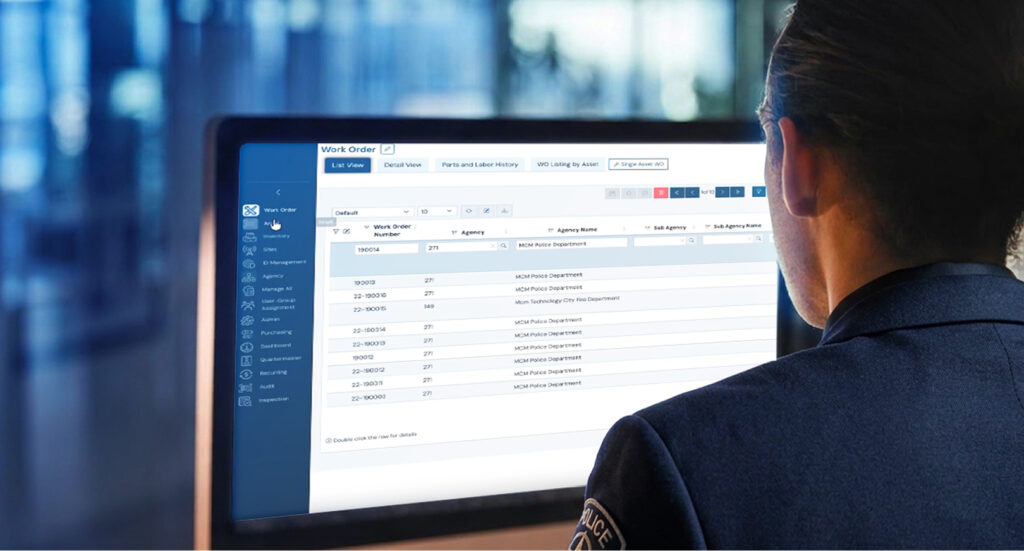
Asset management is about identifying and tracking your assets such as equipment and infrastructure, ensuring their effectiveness, and prolonging their useful life. Asset management software helps manage all of your assets by capturing all of the asset-related details such as location, issue history, configuration, warranty information, service manuals, repair history, site info, cost, vendor, and more in one intuitive solution.
Good Asset Management Software Helps You in the Following Ways…
- Easily captures and stores highly detailed info on each asset: Asset management software makes it easy to capture and update info on each asset. Data fields are synced throughout the system which streamlines the entry process, eliminating the need to enter data into multiple spreadsheets or locations and reducing manual errors. Users can also upload files like photos, maps, manuals, contracts and other documents to the asset record. Barcode technology can be used to quickly scan information into the system. As a result, asset records are robust, reliable and informative.
- Finds information quickly: When it’s easy to store such a wide range of information, your asset records become comprehensive, which means you can find most any information related to a given asset quickly and easily. Not sure what record the information is stored in? Powerful search functions help you easily find data placed in any record or file.
- Tracks what changes were made when and by whom: Having a complete change history in the record is helpful in many ways. If you need more information about a detail that was added, you know who to ask. If there are errors in the data, you know who to address. For configuration management, if you’re not sure when the configuration of an item or network was changed, not only can you find that out easily, you can also see who changed it what it was previously. If the new configuration isn’t working, it’s easy to revert or adjust based on the historic record.
- Automates workflows and alerts: Users can receive alerts when changes are made so they’re kept informed of asset activities and events. Other automated alerts include maintenance reminders, warranty deadlines, and repair projects. All of this means less items “falling through the cracks” resulting in a more reliable network of assets with longer lifecycles.
- Provides industry-specific efficiencies: Asset management software can have specially formulated functions tailored to certain industries. For example, The MCM Platform include data fields uniquely designed to manage communications sites, ID assignments, and other mission-critical radio-centric functions. Fleet-focused solutions capture details relevant to vehicle management such as oil changes, tire rotations, and mileage.
- Generates visual data for easier analysis: Asset management software provides dashboards, visual charts, and graphs to help users to see trends such as equipment models with high turnover rates, teams that are most proactive about maintenance vs. those who tend to lapse, locations that need the most asset support, etc. These visual aids also help with reports.
Not all of these features are in all asset management solutions. Do your research and ask your peers what they use to see what solution may best meet your needs.
Benefits of Using Asset Management Software Include:
Improved accountability – ensure that everyone in the organization is treating assets responsibly
Longer useful life and optimized utilization of assets – get the most of your equipment and infrastructure while avoiding disruptive down time
Asset network reliability – feel secure that your equipment is where it’s supposed to be and that it will work when needed
Cost savings for your organization – reduce unexpected high-cost service and time offline; reduce redundancies and waste
Time-savings for your team – streamline processes and automate workflows so your team can focus on other attention-demanding areas
Data-supported decisions – plan your budget better and get support for procurement or other services based on actual historic data
Successful audits and other regulatory compliance – fulfill audit requirements with ease and follow industry-regulatory criteria to avoid legal repercussion
When to Get Asset Management Software
Perhaps yesterday…. it’s never a bad time. As your organization grows, your network of assets becomes increasingly more complex. Manually keeping track of these assets becomes nearly impossible, and mismanagement can lead to significant losses and risks. If you’re in a mission-critical field or a growth industry, it’s not a matter of if, but when you start using tools built for the task.
Asset management software helps you track, manage, and maintain to make the most of your assets, improving your operations and your bottom line.
You can learn more about our platform here or talk to our team today to learn how MCM can work for you!